
Remove product backgrounds in seconds for Shopify, Etsy, and Amazon listings.
If you sell products online, one of the fastest ways to improve product photos is cleaning up the background.
For Shopify sellers, Etsy stores, Amazon listings, and ecommerce brands, background consistency matters more than most people realize. Cleaner images often lead to better product presentation, higher trust, and improved conversion rates.
PicWish is one of the most popular AI background removal tools for ecommerce sellers because it focuses on speed, simplicity, and bulk product workflows.
This review covers:
- What PicWish does well
- Where it struggles
- Whether it is good for Shopify sellers
- How it compares to Claid.ai
- Whether it is worth using in 2026
Quick Verdict
| Category | Rating |
|---|---|
| Ease of Use | 9/10 |
| Background Removal Quality | 8.5/10 |
| Batch Editing | 9/10 |
| Ecommerce Workflow | 8.5/10 |
| Mobile Editing | 8/10 |
| Advanced Product Enhancement | 6.5/10 |
Best For
- Shopify sellers
- Etsy stores
- Amazon product uploads
- Bulk catalog cleanup
- Fast white-background product images
Not Ideal For
- Premium AI relighting
- High-end ecommerce branding
- Advanced product enhancement workflows
What Is PicWish?
PicWish is an AI-powered image editing tool focused heavily on:
- Background removal
- Product cleanup
- Batch image editing
- Ecommerce image preparation
Unlike general AI image generators, PicWish is designed for workflow efficiency.
The goal is not to create artistic AI images.
The goal is to help ecommerce sellers quickly produce:
- Clean product photos
- White-background images
- Marketplace-ready product listings
- Consistent product presentation
That makes it especially useful for:
- Shopify stores
- Etsy sellers
- Amazon uploads
- Dropshipping catalogs
Why Ecommerce Sellers Use PicWish Instead of ChatGPT
General AI tools can create strong visuals, but ecommerce sellers usually need consistency, batch processing, and product accuracy.
Dedicated ecommerce image tools are built for that workflow.
For Shopify sellers, the goal is not just to create one attractive image. The goal is to process many product photos quickly while keeping products accurate and visually consistent across the entire catalog.
That is where PicWish performs better than general-purpose AI image generators.
Key Features
1. AI Background Removal
This is PicWish’s main strength.
You upload a product image, and the AI automatically removes the background within seconds.
It works well for:
- Clothing
- Beauty products
- Home products
- Electronics
- Accessories
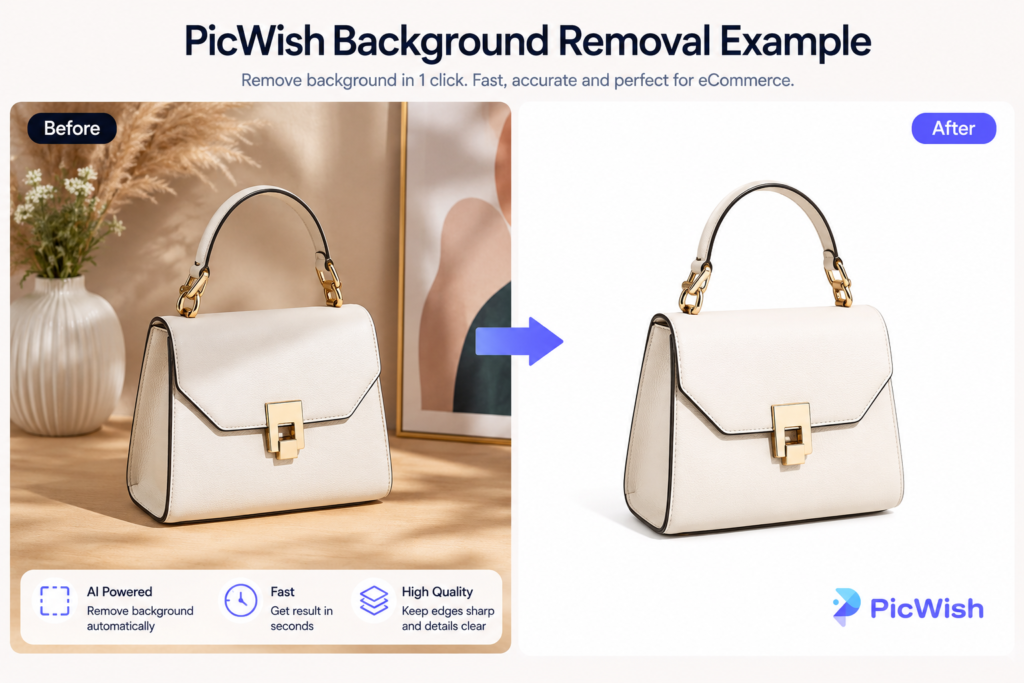
The biggest advantage is speed.
For ecommerce sellers managing many SKUs, fast cleanup workflows matter more than advanced creative effects.
2. Batch Editing
PicWish is particularly useful for sellers handling large product catalogs.
Instead of editing images one by one, you can process multiple images together.
This is important for:
- Shopify product imports
- Amazon catalog preparation
- Etsy listings
- Marketplace consistency
3. White Background Exports
Many ecommerce marketplaces prefer or require clean white backgrounds.
PicWish simplifies this workflow dramatically.
This helps sellers create:
- More professional listings
- Consistent storefronts
- Cleaner mobile shopping experiences
4. Beginner-Friendly Workflow
One reason PicWish is popular is that it does not require advanced editing skills.
The workflow is simple:

Upload Product Photo
↓
Remove Background
↓
Export Image
↓
Upload to Shopify
For many ecommerce sellers, simplicity is more valuable than advanced AI creativity.
Pros and Cons
Pros
- Extremely easy to use
- Fast AI background removal
- Excellent for bulk workflows
- Good white-background exports
- Beginner-friendly
- Strong ecommerce focus
Cons
- Limited AI relighting
- Less advanced enhancement than Claid.ai
- Not focused on premium branding visuals
- Lifestyle scene generation is limited
Who Should Use PicWish?
PicWish is best for sellers who need:
- Fast product cleanup
- Bulk image editing
- Marketplace-ready product photos
- Simple ecommerce workflows
It is especially useful for:
- Shopify sellers
- Etsy shops
- Amazon sellers
- Dropshipping stores
- Small ecommerce teams
PicWish vs Claid.ai
Both tools are ecommerce-focused, but they solve different problems.
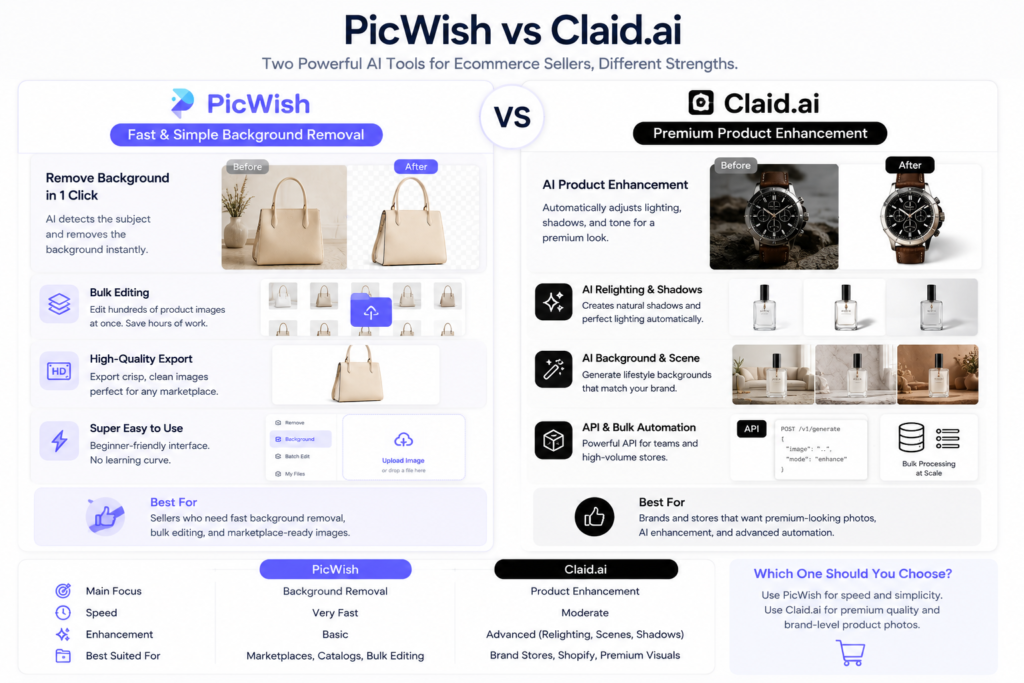
| Feature | PicWish | Claid.ai |
|---|---|---|
| Main Strength | Background removal | Product enhancement |
| Batch Workflow | Excellent | Strong |
| AI Relighting | Weak | Excellent |
| White Backgrounds | Excellent | Good |
| Product Enhancement | Moderate | Excellent |
| Ease of Use | Excellent | Moderate |
Choose PicWish if:
- You need fast background removal
- You manage large catalogs
- You want simple workflows
- You need quick marketplace exports
Choose Claid.ai if:
Pricing
PicWish offers both free and paid plans.
The free version is enough for testing workflows and simple product cleanup.
Paid plans become more useful when you need:
- Batch exports
- Higher image limits
- Faster workflows
- Commercial ecommerce usage
For most Shopify sellers, starting with the free version is reasonable before upgrading.
Final Recommendation
For most ecommerce sellers in 2026, PicWish is one of the best AI background removal tools because it combines:
- Speed
- Simplicity
- Ecommerce-focused workflows
- Batch editing
- Marketplace-ready exports

It is not the most advanced AI image enhancement platform, but it is one of the easiest and fastest tools for getting clean product images ready for Shopify, Etsy, and Amazon.
If your main goal is fast product cleanup and white-background product photos, PicWish is an excellent starting point.
FAQ
Is PicWish good for Shopify sellers?
Yes. PicWish is particularly useful for Shopify sellers who need fast product cleanup and white-background images for product listings.
Is PicWish free?
PicWish offers a free version with limited usage. Paid plans unlock higher limits and batch workflows.
Can PicWish replace Photoshop?
For basic ecommerce workflows, many sellers can use PicWish instead of Photoshop for background removal and simple product cleanup.
Is PicWish good for Amazon listings?
Yes. It works well for creating clean white-background product images suitable for Amazon product pages.
What is the difference between PicWish and Claid.ai?
PicWish focuses on fast background removal and simple ecommerce workflows, while Claid.ai focuses more on premium product enhancement and AI relighting.
Pingback: Claid.ai vs PicWish: Which Is Better for Ecommerce Product Photos? – aistoretools.com